
Introduction: What a jukebox can add to your bar or restaurant
If we run a bar or restaurant, deciding whether to add a jukebox is really a decision about the room: how we want it to feel, who we want to feel welcome, and how much of the music experience we want guests to shape. A TouchTunes jukebox may suit a venue where music can be part of the occasion, but it won’t be right for every layout or service style. We can start by considering the atmosphere we want to create, then assess whether a guest-selected music experience supports it.
Before making a decision, we need to think beyond the equipment itself. Where could it go without obstructing staff or guests? How might customers use it, and what should staff say when someone has a question? Would music selected by guests fit during dinner, a busy evening, or both?
This guide considers the guest experience, placement, music and atmosphere, and daily operations. It also offers a simple way to decide whether a TouchTunes jukebox fits our venue’s customers and working routines.

Benefits of a TouchTunes jukebox in a bar or restaurant
A jukebox can give guests a more active role in the room’s music. Instead of hearing only a playlist chosen in advance, customers may be able to select songs through the jukebox’s available selection method. That participation can become part of a night out: a group celebrating a birthday, for example, might choose music that feels connected to the occasion. Whether that suits our customers depends on the venue and on how the system works in practice.
Music also helps establish a venue’s character. In a neighborhood bar, a visible jukebox might feel like a natural part of a lively, social room. In a relaxed restaurant, guest-selected music may need a more limited role so diners can talk comfortably. Neither setting is automatically better. The useful question is whether the music experience reinforces what we already want guests to feel when they enter, order, and spend time with us.
For some venues, shared selections can give groups another reason to engage with the room and each other. Regular customers may enjoy knowing that they can influence the sound of a familiar place, while visitors may find the option an easy way to take part. These are possibilities, not guaranteed effects on visits or sales. We should consider https://www.touchtunes.com/business/bars-restaurants in the context of our own customer mix and operations, rather than treating a jukebox as a general business solution.
A jukebox differs from background music because it can be a visible part of the guest experience. That distinction matters: equipment placed where customers notice it may invite interaction, while music heard quietly across a dining room may simply support conversation. Before deciding, we can write down the experience we want in plain terms—such as “energetic and social after dinner” or “easy conversation throughout service”—and ask whether a jukebox supports that aim.
What a TouchTunes jukebox is and how guests use it
In a bar or restaurant, a jukebox is a music-playing system that gives guests a role in selecting songs. The exact selection method and available capabilities can change, so we should check current TouchTunes product information rather than assume a particular app, payment option, catalog, or device compatibility.
At a high level, a guest journey is straightforward: someone notices the jukebox, finds out how selections are made, chooses music using the method available, and hears selections played in the venue. The steps may seem obvious to a customer who has used a similar system before and less obvious to someone encountering it for the first time. Clear placement and simple staff guidance can make the difference between a guest feeling invited to participate and feeling unsure what to do.
We should make sure the team knows the basic guest-facing process before the jukebox is in regular use. Staff don’t need to become technical support, but they should know how to direct a customer to the right instructions and whom to contact if a question goes beyond their knowledge. That preparation can prevent a small query from turning into an interruption during a busy service.
The experience also depends on the room. A selection may be noticeable near the bar and much less apparent in a separate dining area. Volume, the venue’s music policy, and the mix of customers all affect how guest-selected music feels.
Choosing the right placement and role for the jukebox
Good placement begins with the intended listening area, not with an empty corner. If we want music to be part of the bar area but not dominate dinner, the location and room layout should support that distinction. We can plan systematically rather than installing the equipment wherever it seems convenient on the day.
- Identify the listening area. Decide which parts of the venue should hear the music and where conversation should remain easy.
- Observe customer flow. Watch how guests enter, queue, order, move between tables, and approach service points.
- Choose a visible, practical location. Customers should be able to notice the jukebox, but it shouldn’t block a route, an ordering point, or a staff task.
- Check circulation and sightlines. Consider nearby seating, doorways, service routes, and whether people can gather without crowding others.
- Review it at different times. Look at the proposed position during both a quiet period and a busy one before treating it as settled.
Placement affects more than appearance. A jukebox next to a narrow passage can create a bottleneck when guests stop to use it. A position beside a busy service station may add questions and foot traffic exactly where staff need room to work. Conversely, an out-of-the-way location may be easy to accommodate but hard for customers to discover. We should aim for a place that supports participation without competing with ordering, conversation, or service.
Once the venue is operating, staff can tell us what a floor plan doesn’t. They may notice that guests cluster in an awkward spot, ask the same question repeatedly, or struggle to hear music in an area where we expected it to carry. We can ask for specific observations after opening and adjust the arrangement if necessary.
Matching music and atmosphere to your customers
The same music setup can create different impressions in different venues. In a sports bar, a guest-selected track might become one element of a lively evening. In a neighborhood pub, it could support the feeling that regulars have a say in a familiar room. A café may prefer music that stays in the background, while a full-service restaurant may need conversation to remain easy through dinner. The equipment alone doesn’t determine the atmosphere; how we fit it into the room does.
We can think about the experience by time of day, event, and area rather than choose one mood for every occasion. A restaurant might want a restrained sound during dinner service, while a bar may welcome more participation later in the evening. A private gathering could bring different expectations from an ordinary weekday. Mapping these situations helps us see whether guest selection has a clear role or whether it would complicate an atmosphere that depends on consistency.
Staff also need a sensible way to respond when guests make requests or ask about music. A useful starting point is to acknowledge the request, explain the venue’s approach, and follow the same guidance across shifts. If a selection or volume request conflicts with house rules, staff can respond politely and consistently instead of negotiating from scratch each time. We should decide in advance who handles a disagreement and when a manager should step in.
Before launch, we can write brief internal guidance covering the desired volume, when guest participation is appropriate, and how staff should answer common questions. We shouldn’t assume particular controls or policies are available; those details need checking against current TouchTunes information.

Planning for daily operations and guest questions
Before installation, we should decide who owns the day-to-day process. If no one is responsible, basic questions can bounce between staff, and a manager may only discover a recurring issue after several shifts. Assigning an owner doesn’t mean one person must handle every interaction; it means the team knows who keeps guidance current and where to direct questions that need follow-up.
We can settle three practical points before the jukebox enters regular use: who oversees it, how staff answer basic guest questions, and whom they contact for support. We should also ask TouchTunes what setup and service arrangements apply to our venue. Specific operating terms, installation responsibilities, and venue requirements should be confirmed directly rather than inferred from another business’s experience.
Where it makes sense, we can include a brief check in opening and closing routines. The purpose is to ensure staff know the equipment is present and can flag a concern, not to invent maintenance tasks that may not apply. We should follow the instructions provided for the product and avoid asking employees to troubleshoot beyond their training. If a question requires technical assistance, a clear escalation route saves time and reduces the risk of conflicting answers.
A short staff briefing can cover four things: why the venue has a jukebox, how guests find the selection process, what the venue expects around volume and requests, and who handles unresolved issues. We should also practise a neutral response to a request that conflicts with house rules—for example, explaining that the venue is keeping music at a level that allows nearby diners to talk.
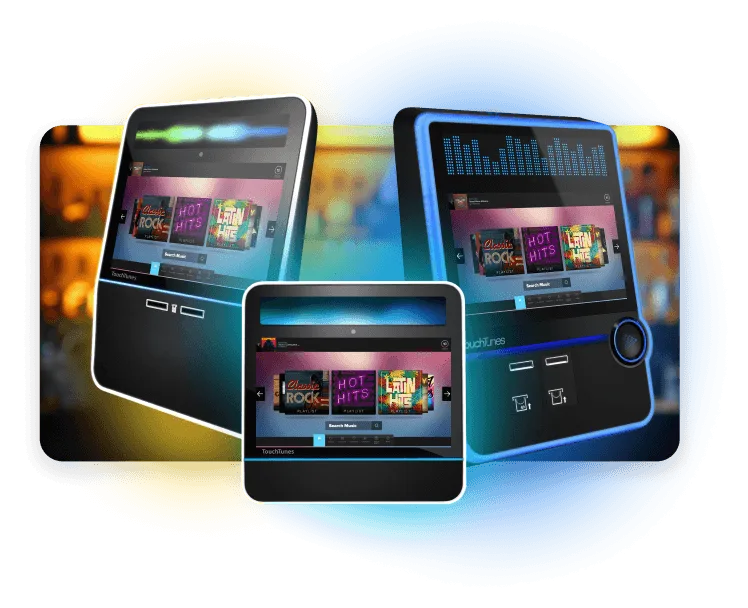
Is a TouchTunes jukebox a good fit for your venue?
A useful fit check starts with five questions: Do our customers seem likely to welcome a role in selecting music? Does the room have a practical place for the equipment? Can we define the atmosphere we want? Do staff have the capacity to answer basic questions? And are we comfortable with guest participation as part of the experience? If we can answer these clearly, we’re in a better position to judge the option on its merits.
A jukebox may be less suitable if our business depends on tightly controlled music or needs a consistently quiet environment. A dining room built around low-volume conversation, for instance, may have little room for a participatory music feature. On the other hand, a bar that already has a social, music-friendly character may find the idea more natural. These are starting points, not rules: the room, customer expectations, and operating model matter more than the venue label.
We should compare possible benefits with constraints instead of treating the equipment as a universal answer. A visible jukebox might give guests a way to participate, but it also needs a workable location and a clear staff response. Before deciding, we can ask employees what they expect to be easy or difficult, then listen to regular customers without promising that their preferences will determine the final decision. Their feedback can reveal whether participation sounds appealing or likely to distract from what they value about the venue.
Finally, we need to confirm commercial and product details. Ask TouchTunes about availability, installation arrangements, costs, operating terms, support, and any venue-specific requirements. We should also verify which capabilities are currently offered and whether they fit the music policy we’ve set.
Conclusion: Take the next step for your bar or restaurant
The central question is whether guest-selected music belongs in the atmosphere we want to create. A TouchTunes jukebox may suit a venue where participation feels natural, the layout can accommodate it, and staff can explain the basics. If we need highly controlled music or a consistently quiet room, the practical fit may be weaker. Deciding on those conditions first makes the product conversation more useful.
We can take four concrete steps. First, describe the guest experience we want at different times of day. Second, walk the room and identify a location that is visible without disrupting customer flow or service. Third, brief staff on the purpose, guest instructions, house expectations, and escalation process. Fourth, list questions about current capabilities, installation, availability, costs, support, and operating terms.
Then we can review the TouchTunes business information for bars and restaurants at https://www.touchtunes.com/business/bars-restaurants and contact TouchTunes to confirm options for our venue. We should bring specific details to that conversation: the areas where music is wanted, the times when it should be most noticeable, the staff member responsible, and any house rules that could affect guest selections. That makes it easier to assess the arrangement against our actual operation.
A jukebox is not a promise of a particular business outcome; it is one possible way to shape the guest experience. We can compare the confirmed product and commercial details with our customers, floor plan, and service style, then decide whether the fit is persuasive.

Key Takeaways
- Decide what atmosphere we want before choosing a music setup.
- Assess guest flow, staff routes, sightlines, and listening areas before settling on placement.
- Prepare staff to explain the guest process and follow consistent guidance on music requests.
- Confirm current product capabilities, installation, costs, support, and operating terms directly with TouchTunes.
- Compare the practical fit with our customers and service style before making a decision.
Frequently Asked Questions
What does a jukebox add to a bar or restaurant?
A jukebox can give guests a way to participate in the venue’s music rather than only hear a fixed playlist. Whether that supports the atmosphere depends on the customers, room layout, music policy, and service style.
Where should we place a jukebox in our venue?
Choose a location guests can notice and approach without blocking walkways, ordering areas, seating, or staff routes. Review the proposed spot during both busy and quiet periods, and ask staff for feedback once the venue is operating.
Will a jukebox suit a restaurant where guests need to talk?
It may, if the placement and music approach preserve comfortable conversation. A restaurant that relies on a consistently quiet or tightly controlled sound environment should weigh that need carefully before deciding.
What should staff know before a jukebox is installed?
Staff should understand the jukebox’s purpose, how guests access the selection process, the venue’s expectations for music and requests, and whom to contact when they can’t answer a question. Confirm the actual guest instructions and support arrangements with TouchTunes.
What details should we confirm with TouchTunes?
Ask about current capabilities, availability, installation arrangements, costs, operating terms, support, and any venue-specific requirements. Confirm details directly rather than assuming a feature or arrangement is included.
Can a jukebox guarantee more customers or longer visits?
No particular business outcome should be assumed. A jukebox may contribute to the guest experience in a venue where participation fits, but its value depends on the room, customers, and how it is operated.
